Stop thePermission Scavenger Hunt
Find the missing permission in seconds, not minutes. One-click diagnosis reveals exactly what's blocking your users — and how to fix it.
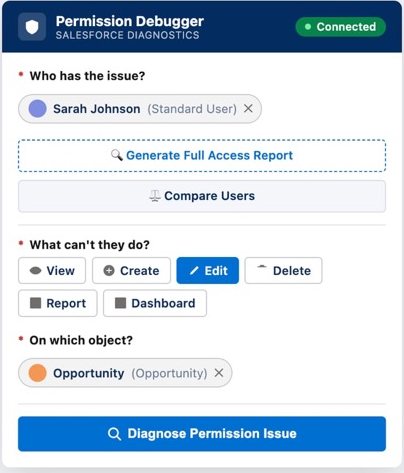
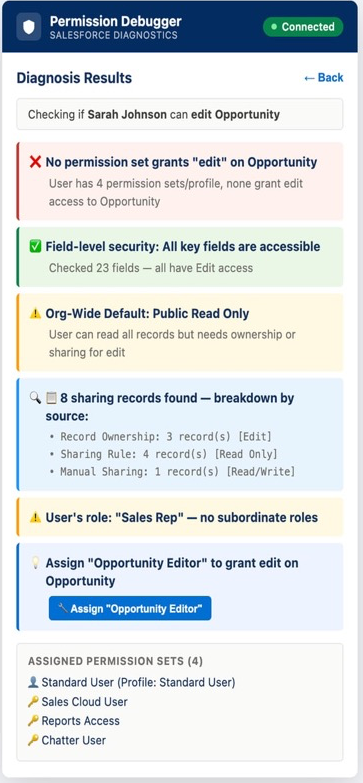
Know exactly what's missing — and how to fix it
One click reveals the complete picture: CRUD permissions, field-level security, org-wide defaults, sharing rules, and specific fix suggestions.
Sharing rule breakdown (RowCause analysis)
Same profile, different access? See exactly why. RowCause analysis shows how each sharing record was created — ownership, sharing rules, manual shares, Apex managed, or team membership.
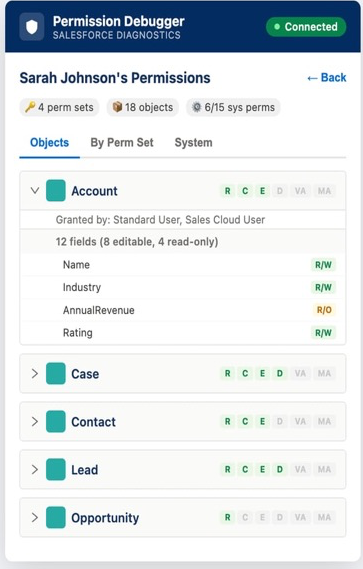
See everything a user can do — at a glance
Generate a complete access report for any user. CRUD permissions across all objects, which permission sets grant what, and drill into field-level security.
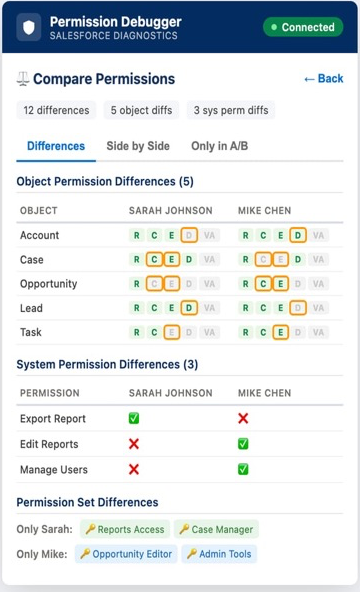
Spot the difference between any two users
"This user can do it, but that user can't." Compare any two users side-by-side to instantly see every object permission, system permission, and permission set difference.
Three Steps. Ten Seconds. Done.
No more guessing. No more logging in as users. Just answers.
Pick the User
Search by name — see their profile, role, and active permission sets instantly.
Select the Action
What can't they do? View, Create, Edit, Delete, access a Report, or see a Dashboard.
Get the Answer
See exactly which permission is missing, why, and get specific fix recommendations.
Built for Power Users
Everything you need to diagnose and fix permission issues, right from your browser.
CRUD Permission Checks
Instantly check Create, Read, Update, Delete permissions on any object — standard or custom.
Report & Dashboard Access Debugging
Diagnose why users can't see reports or dashboards — folder access, sharing settings, and more.
Field-Level Security Analysis
Deep dive into field permissions to understand exactly what users can see and edit.
Sharing/Record Access Breakdown
See RowCause analysis — how each record access was granted through ownership, sharing rules, manual shares.
Compare Users Side-by-Side
Spot the exact differences between any two users to find what's causing the access gap.
Copy Permissions Between Users
Quickly replicate permission setups by copying configurations from one user to another.
Full Access Report Generation
Generate comprehensive permission audits for any user — everything they can access.
Fix Suggestions with One-Click Apply
Get actionable recommendations and apply permission fixes instantly.
Privacy First. Always.
"Your data never leaves your browser"
Works Everywhere
Lightning, Classic, Setup, custom domains, sandboxes — if it's Salesforce, it works.
100% Client-Side
All processing happens in your browser. No data leaves your computer. Ever.
Instant Results
No waiting, no loading. Get permission analysis in under 10 seconds.
Open Source
Full transparency — inspect the code and verify our privacy claims yourself.
Without vs With
Without the Extension
- ❌Check user's profile permissions manually
- ❌Hunt through 5+ permission sets
- ❌Verify sharing rules and OWDs
- ❌Check field-level security per object
- ❌Log in as the user to reproduce the issue
- ❌30-60 minutes of detective work
With the Extension
- ✅Select user from dropdown
- ✅Pick the action they can't do
- ✅Get instant diagnosis with full context
- ✅See sharing rule breakdown (who granted access and why)
- ✅Get exact fix recommendations
- ✅10 seconds total
Ready to End thePermission Hunt?
Install the extension and diagnose your first permission issue in under 10 seconds.